In our sixth blog in our Release Notes series, we go over the feature additions and improvements that have come out in our development releases in the latter part of June and the first part of July. We’re always making improvements to ProWorkflow Nexus, and these release note blogs will help you learn about them. Click here to view our previous Release Notes blog.
Feature Release: Nexus Project Requests and Custom Project Requests!
We know a lot of you have been waiting for Project Requests in Nexus – not only do we now have Project Requests ready to go with all the functionality you’re used to in Classic, but we also have a brand new feature: Custom Project Requests! Custom Project Requests allow you to use the powerful Custom Form Builder to create Custom Forms and workflows for your project requests. Check out our blog introducing Custom Project Requests here, and check out our help article on Project Requests here for instructions on using either type of Project Request.

Feature Release: Timesheet Approval
With our latest release we’ve introduced Timesheet Approval into Nexus, and more effective Staff management! You can now have your Staff submit a timesheet, approve or decline submissions, and lock weeks or days from further time entries.
The powerful Nexus Timesheet page also allows you to manage time logs directly on the review screen. You can adjust the rate of the time log, change the amount of time or the time and date it was logged on, split the time log between multiple entries, or delete it entirely.
This allows you to more easily and effectively manage your staff’s work. Locking days prevents staff from making additional time entries after payroll has already been processed. Requiring your staff to submit their timesheet for review means you can also more easily ensure that all work is logged for a time period before you start invoicing your clients. Editing or splitting time logs means that you have a finer control over what is invoiced when.
Please see our help article here for more information on using Timesheet Approval.
Timesheet Approval can be done on the “Review” page of your Timesheets:

And you can manage your Timesheet Approval settings in your Settings under “Timesheet Approval”:

Feature Release: Daily Summary Report
Our Developers recently completed their work optimizing the Daily Summary Report for Nexus and it is now available. Keep an eye on your Projects and Items that are overdue or approaching their due date with this automated report to your email! Simply toggle on the appropriate Notifications in the Email Notifications section of your settings:

Feature Improvement: Review Quotes and Invoices Totals over a Time Period on the Client Page
We’ve refined how Quotes and Invoices appear on the Client page. You can now select a time period for your Quotes and Invoices, and the page will display a total for each month of the selected time period, along with an indicator of how many Quotes or Invoices made up that total:
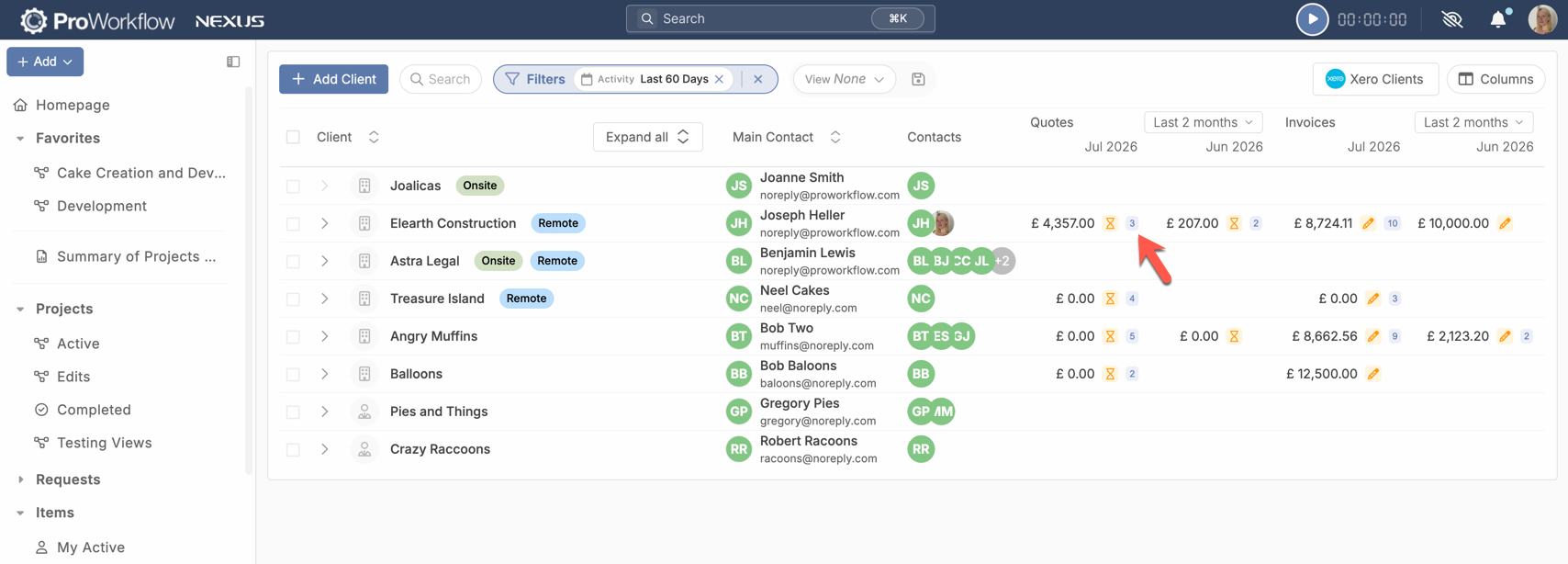
This allows you to easily see at-a-glance where you need to do your invoicing – have you quoted significantly more than you’ve invoiced? Is there a client that you have missed invoicing for a month? Track that on the Clients page!
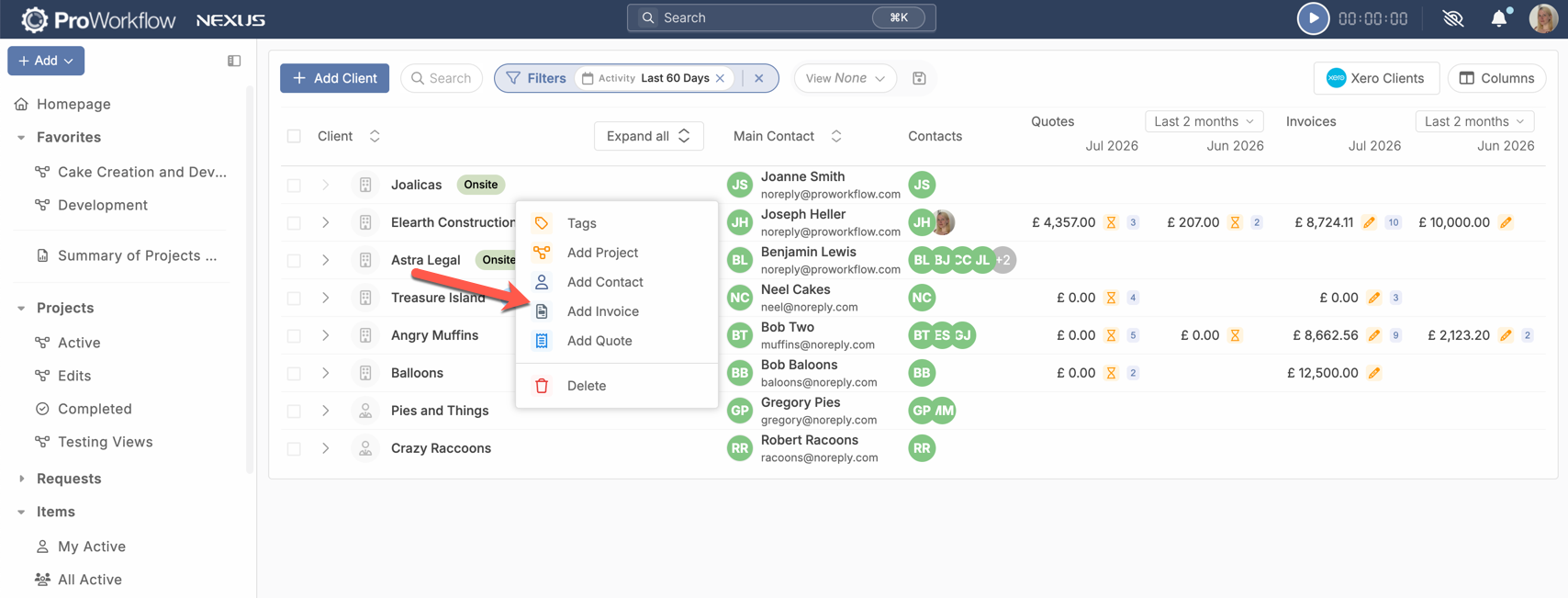
You can even create an Invoice against a Client directly on this page:
Feature Release: Page Break for Quotes and Invoices Text Fields
We’ve added an exciting new Quotes and Invoicing functionality for those of you with longer Quotes and Invoices: you can now insert a Page Break in any text field, including the description of the Quote/Invoice and the description of Items on Quotes/Invoices. This allows you to more easily control the formatting of how your Quote/Invoice displays as a PDF!

Feature Improvement: Custom Forms “Block Submission”
We’ve added an additional functionality to Custom Forms, so now in addition to being able to make fields required before submission, you can set specific responses as required to submit, and block submission of the form if the response doesn’t match the desired response. A submission block will also prevent a user from continuing further in the form if there is more than one page/step to the form.

Feature Improvement: Saved Views on Clients List Page
We’ve improved the filtering options on the Client list page, and added support for the Saved Views functionality. Enjoy the same customizable view system you use on Projects and Items on the Clients page!

Feature Improvement: Additional Grouping Options for Projects and Items List Pages
To help improve your options for customizing your view, we’ve added additional Grouping options. You can now Group both the Projects and Items list pages by Contact, by Staff on the Projects list page, and by Phase on the Items list page.

Feature Improvement: Additional Filters on Quotes and Invoices
We’ve added additional filtering options to the Quotes and Invoices page to help you better narrow down the work you choose to look at on those pages and more efficiently review your financials.

Feature Improvement: Clone Completed Projects
You no longer need to reactivate a Project in order to clone it – we now allow you to Clone completed projects.
Feature Improvement: Curly Bracer Codes on Templates
We’ve added support that allows you to input curly bracer codes in to templates and have those details auto-populate based on the code. These codes will work on Item, Quote, Project, and Invoice templates. The codes available for use are {title} {number} {code} {company} which will pull, respectively, the Project Title, Project Number, Project Code, and Client Company.
Get These Features By Upgrading to ProWorkflow Nexus Today!
Whether you are an existing Classic customer who is looking to convert to Nexus, or you’re a new prospective client who wants to start a subscription with us, you can start using Nexus today to take advantage of these exciting new features. Existing clients please reach out to our Support team at [email protected] to get Nexus enabled for your account and start the migration process. New clients please start a trial account or contact our Sales team at [email protected].