Single sign-on (SSO) lets your team sign in to ProWorkflow with the work account they already use every day. No extra password to remember, and one place for IT to manage who has access.
ProWorkflow works with Microsoft Azure, Google Workspace, Okta and OneLogin, and you can switch it on yourself from Settings.
Why teams turn on SSO
- One login. People sign in with their Microsoft, Google, Okta or OneLogin account instead of another password.
- Faster onboarding. New starters get going with the account they already have.
- Cleaner offboarding. When someone leaves and their work account is switched off, their sign-in goes with it.
- Security policies in one place. Password rules and multi-factor sign-in are managed in your identity provider, not app by app.
Supported providers
| Provider | How it connects |
|---|---|
| Microsoft Azure | Azure-linked single sign-on with your Microsoft work account |
| Google Workspace | Single sign-on with your Google Workspace account |
| Okta | SAML single sign-on through Okta |
| OneLogin | Single sign-on managed through OneLogin |
How to set it up
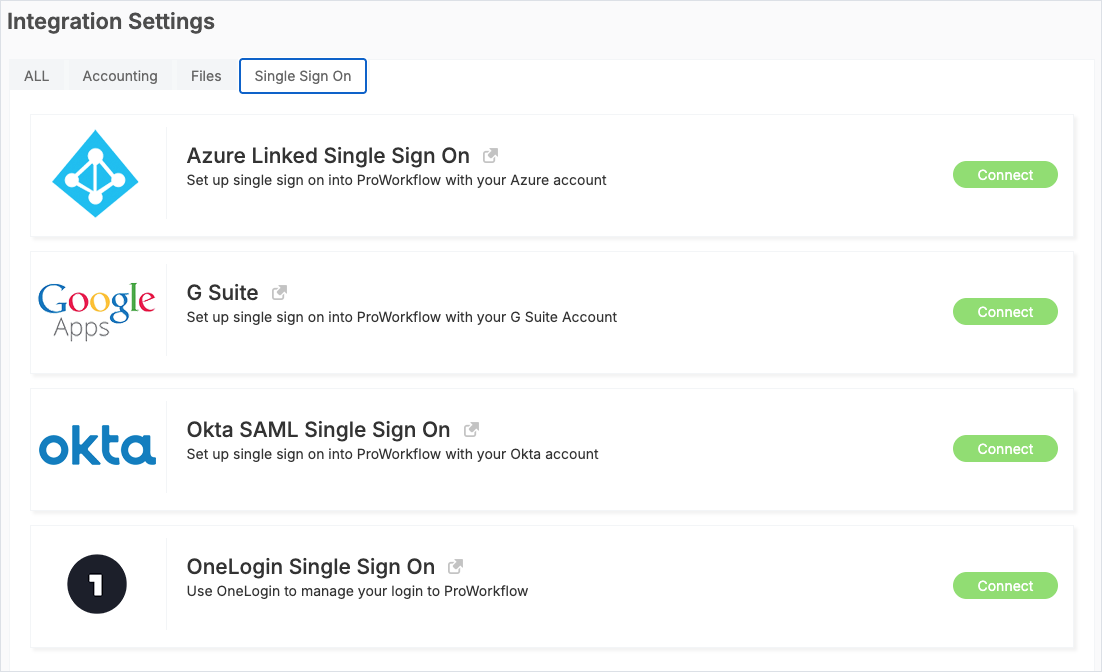
- In ProWorkflow, go to Settings → Integration Settings and open the Single Sign On tab.
- Click Connect next to your provider.
- Follow the prompts to link your identity provider, then let your team know they can sign in with their work account.
You will need admin access to Settings in ProWorkflow, and your identity provider admin may need to approve the connection.
Not using SSO yet? Turn on two-factor sign-in
If you are not ready for SSO, you can still require two-factor authentication for everyone. Go to Settings → General Settings → Mandatory Two Factor Authentication.
Connect the rest of your stack
SSO is one part of fitting ProWorkflow into the tools you already run. See everything ProWorkflow connects to, or build your own connection with the Nexus API and OAuth.
FAQ
Which SSO providers does ProWorkflow support?
Microsoft Azure, Google Workspace, Okta (SAML) and OneLogin.
Who can set up SSO?
A ProWorkflow admin sets it up from Settings → Integration Settings → Single Sign On. Your identity provider admin may need to approve the connection.
Does SSO replace two-factor authentication?
Multi-factor sign-in is handled by your identity provider once SSO is on. Without SSO, you can make two-factor authentication mandatory in General Settings.
Is SSO available on every plan?
Check the pricing page or talk to our team about your plan.