A good intake form saves your team hours on every new project, but starting from a blank page is hard. Below are three intake forms we see working well for agencies and consultancies: a creative brief, a website brief and a consulting scope.
Each one lists the questions to ask, the field type to use and the automation to add, so a submitted form becomes a ready-to-start project. Copy them as they are, or use them as a starting point for your own.
Download all three templates (PDF)
Before you start
Three rules make any intake form better:
- Ask only what you need to start. Collect the rest at kickoff.
- Make the essentials required: project type, deadline and contact details.
- Use rules to keep it short. Show follow-up questions only when an earlier answer calls for them.
New to intake? Read how to set up a client intake process first.
1. Creative brief template
For design and branding agencies: logos, brand identity, print and campaign creative.
| Question | Field type | Automation in ProWorkflow |
|---|---|---|
| Your name, company and email | Contact details | Creates the client contact on the project |
| What type of project is this? | Single choice: Brand identity, Print, Campaign, Other | Attach the matching project template |
| What is the goal of this work? | Long text | Becomes the project description |
| Who is the audience? | Long text | – |
| Do you have existing brand guidelines? | Yes / No | Yes: show a file upload for guidelines and logos |
| Upload logos, guidelines or reference files | File upload, multiple files | Files attach to the project |
| When do you need it by? | Date, at least 10 days from today, weekdays only | Sets the project due date |
| What is your budget? | Number with $ prefix | Over $50,000: set High priority |
| How many rounds of revisions do you expect? | Dropdown: 1, 2, 3+ | – |
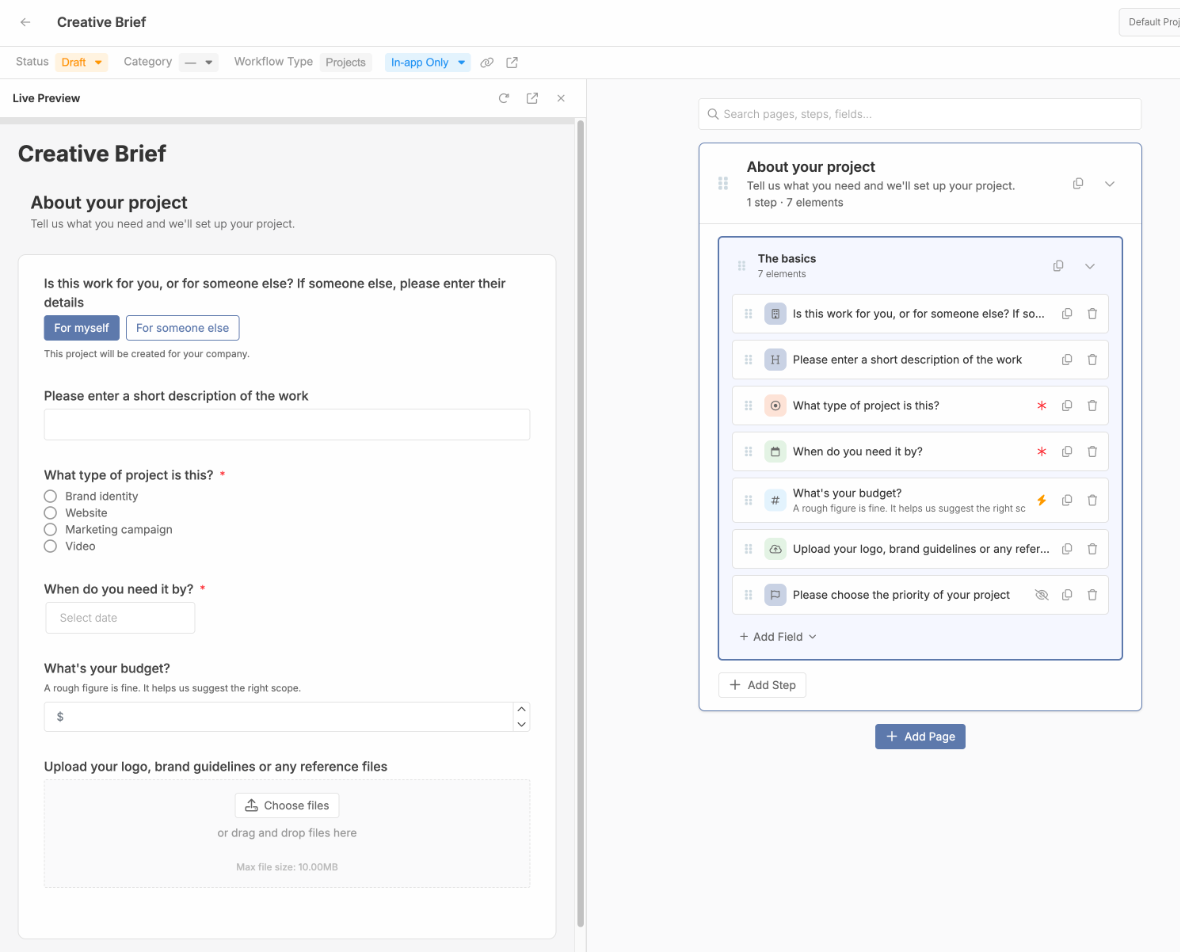
Here is the start of this form built in ProWorkflow, with the live preview on the left:
2. Website brief template
For web studios and digital agencies: new sites, redesigns and landing pages.
| Question | Field type | Automation in ProWorkflow |
|---|---|---|
| Your name, company and email | Contact details | Creates the client contact on the project |
| Is this a new site or a redesign? | Single choice | Redesign: show "Current website URL" |
| Current website URL | URL, hidden by default | – |
| How many pages do you expect? | Dropdown: 1-5, 6-15, 16-40, 40+ | Larger sites: assign a senior project manager |
| Which features do you need? | Multiple choice: e-commerce, bookings, blog, forms, integrations | – |
| Who will write and supply the content? | Single choice: We will, You will, Mix | – |
| Upload a sitemap, copy or examples you like | File upload, multiple files | Files attach to the project |
| Launch date | Date, at least 30 days from today | Sets the project due date |
| Budget range | Dropdown | Sets the project category or priority |
3. Consulting scope template
For consultancies and professional services: advisory, audits and strategy work.
| Question | Field type | Automation in ProWorkflow |
|---|---|---|
| Your name, organisation and role | Contact details | Creates the client contact on the project |
| What problem do you want to solve? | Long text | Becomes the project description |
| What does success look like in six months? | Long text | – |
| Which service are you interested in? | Single choice: Strategy, Operations, Finance, Technology | Assigns the right manager and team |
| Who are the key stakeholders? | Long text | – |
| Is there a hard deadline or board date? | Date, optional | Sets the project due date |
| What budget have you set aside? | Number with $ prefix | Set High priority over your threshold |
| Upload any reports, data or previous work | File upload, multiple files | Files attach to the project |
| How did you hear about us? | Dropdown | Tags the project with the lead source |
How to build these in ProWorkflow
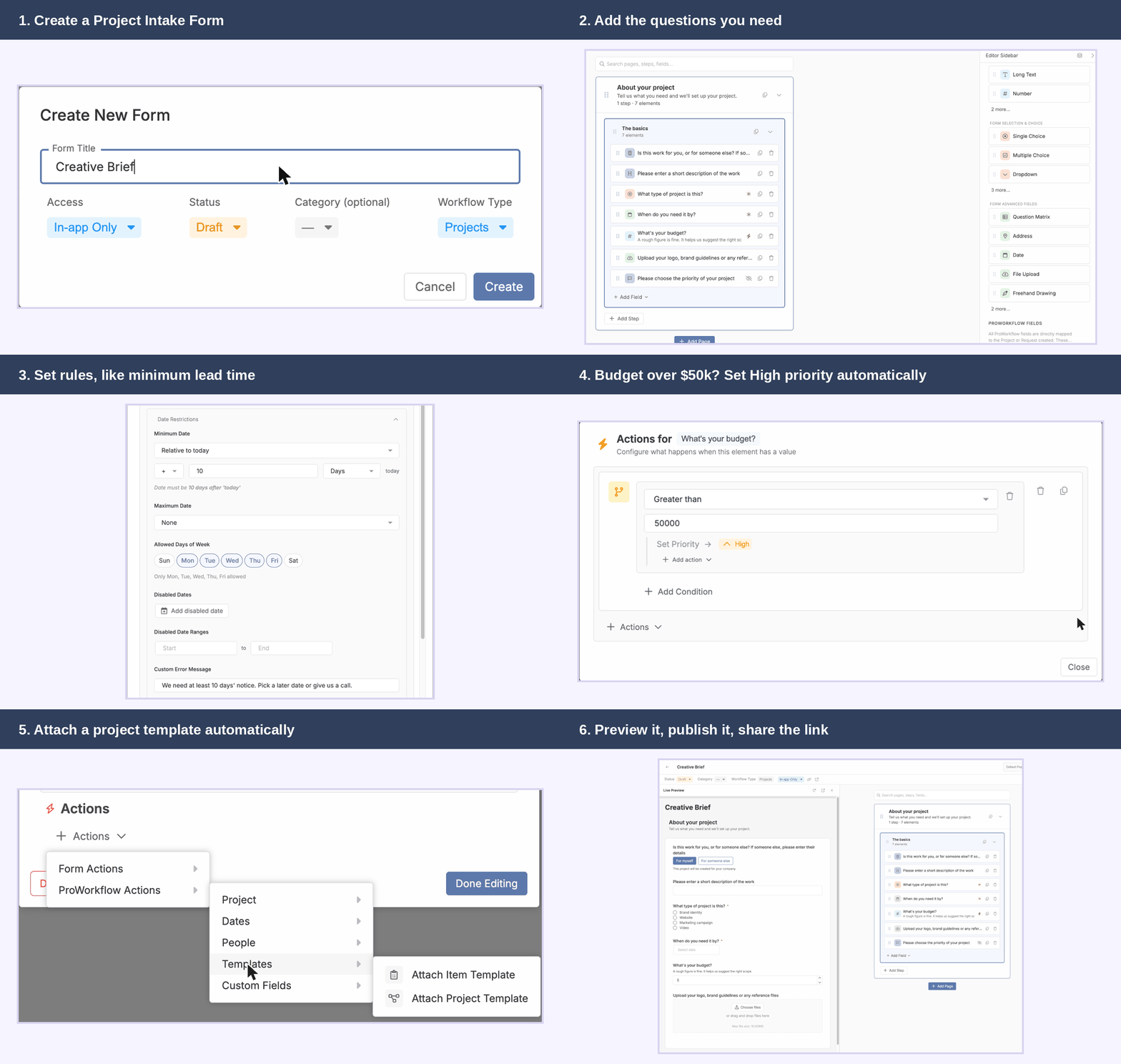
- Go to Settings > Custom Form Builder and choose Projects Intake Form to create projects automatically, or Custom Request if you want to approve work first.
- Click Create Form, name it after the template and leave it as a draft.
- Add each question from the table using the field types in the sidebar, and mark the essentials as required.
- Add the automation: date limits on the deadline, ProWorkflow fields such as Priority and Manager set to hidden, and actions that set them or attach a project template.
- Use Live Preview to test every path, then set the form to Published and share the link.
For every field type and action, see How to use the Custom Form Builder.
FAQ
Can I use these templates without ProWorkflow?
Yes. The questions work in any form tool. The automation column shows what ProWorkflow can do with each answer.
Should clients be able to fill these in without logging in?
Usually, yes. In ProWorkflow, set the form’s access to External to get a public link that anyone can use.
How many questions should an intake form have?
As few as you can act on. Most good intake forms have eight to twelve, with follow-up questions shown only when they apply.
How do I know which questions to keep?
Look at what you still have to chase after a form comes in. This is where a project management tool like ProWorkflow helps: every submission becomes a project with its answers and files attached, so you can see which questions earn their place based on real submissions rather than assumptions.