Margin and markup both describe the profit you make on a sale, but they measure it against different numbers. Mix them up and you can price every job 5 to 10 points below the profit you think you are making.
The quick answer
- Margin = profit ÷ price. It is the share of the price you keep.
- Markup = profit ÷ cost. It is how much you add on top of cost.
Same profit, two different percentages. A 25% margin is a 33.3% markup, and a 25% markup is only a 20% margin.
A worked example for an hourly service
Say one billable hour of a senior consultant costs your business $64.29, once salary, on-costs, overheads and non-billable time are included. You charge $85.72 for that hour.
| Formula | Result | |
|---|---|---|
| Profit | $85.72 − $64.29 | $21.43 |
| Margin | $21.43 ÷ $85.72 | 25.0% |
| Markup | $21.43 ÷ $64.29 | 33.3% |
Both numbers are correct. They just answer different questions. Margin tells you how much of every dollar you bill is profit. Markup tells you how much to add to cost when you set a price.
The mistake that costs agencies money
The common slip is deciding “we want 25%” and adding 25% to cost:
$64.29 × 1.25 = $80.36 an hour. Profit is $16.07, which is only a 20% margin.
On a team billing 10,000 hours a year, that gap of $5.36 an hour is more than $53,000 of profit you planned for but never made.
How to price for a target margin
To hit a target margin, divide your cost by (1 − margin):
Price = cost ÷ (1 − target margin)
For a 25% margin: $64.29 ÷ 0.75 = $85.72. Try it with your own numbers in our free charge-out rate calculator.
Margin to markup conversion table
Use this to translate between the two. Markup = margin ÷ (1 − margin).
| Target margin | Markup needed |
|---|---|
| 10% | 11.1% |
| 15% | 17.6% |
| 20% | 25.0% |
| 25% | 33.3% |
| 30% | 42.9% |
| 35% | 53.8% |
| 40% | 66.7% |
| 50% | 100.0% |
Going the other way, margin = markup ÷ (1 + markup). A 30% markup is a 23.1% margin; a 50% markup is a 33.3% margin.
Which one should you track?
- Track margin for the business and for each project. It lines up with your profit and loss statement, where profit is always shown against revenue.
- Use markup when you build up a price from cost, such as adding a margin to materials or subcontractors. Just convert it from your target margin first.
See margin and markup side by side in ProWorkflow
In ProWorkflow you enter a cost rate and a target margin, and the charge rate, profit and markup are worked out for you. No spreadsheet, no mixing the two up.
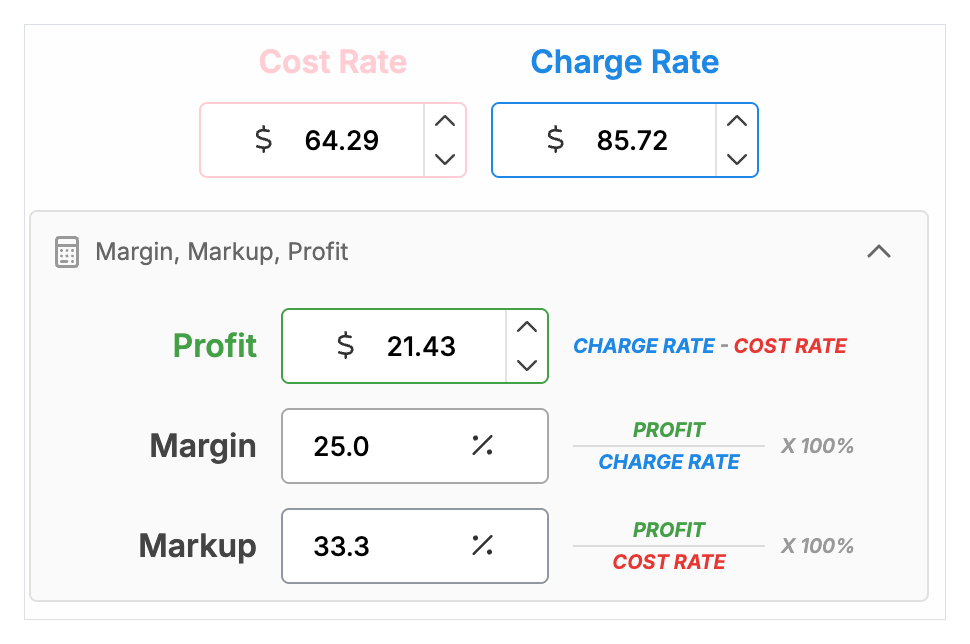
Margin is then tracked live on every project as time is logged. Read how to set up cost and charge rates, or work out your rates from scratch with our guide, How to calculate your charge-out rate.
Next: once you know the margin you need, track project profitability with budget vs actual so you can see margin slipping while there is still time to fix it.
FAQ
Is margin or markup higher?
Markup is always the higher percentage for the same profit, because it is measured against cost, which is smaller than price.
What is a 25% markup as a margin?
20%. Margin = 25 ÷ 125 = 0.20.
What markup gives a 30% margin?
42.9%. Markup = 30 ÷ 70 = 0.429.
How do I calculate price from cost and margin?
Price = cost ÷ (1 − margin). For a $64.29 cost and a 25% margin, the price is $85.72.
Should a service business use margin or markup?
Track margin, because that is how profit shows on your accounts. Use markup only as a pricing shortcut, converted from your target margin. In ProWorkflow you enter a target margin on each hourly rate and it works out the charge rate and markup for you, then shows the margin you actually achieved on every project.