In our third blog in our new Release Notes series, we go over the feature additions and improvements that have come out in our development releases in the latter part of March and the first part of April. We’re always making improvements to ProWorkflow Nexus, and these release note blogs will help you learn about them. Click here to view our previous Release Notes blog.
Feature Addition: Client Insights
The new Client Insights module allows you to see important financial information against any Client company at a glance. Open up the Client company from your Clients page to see insights for both Quotes and Invoices:


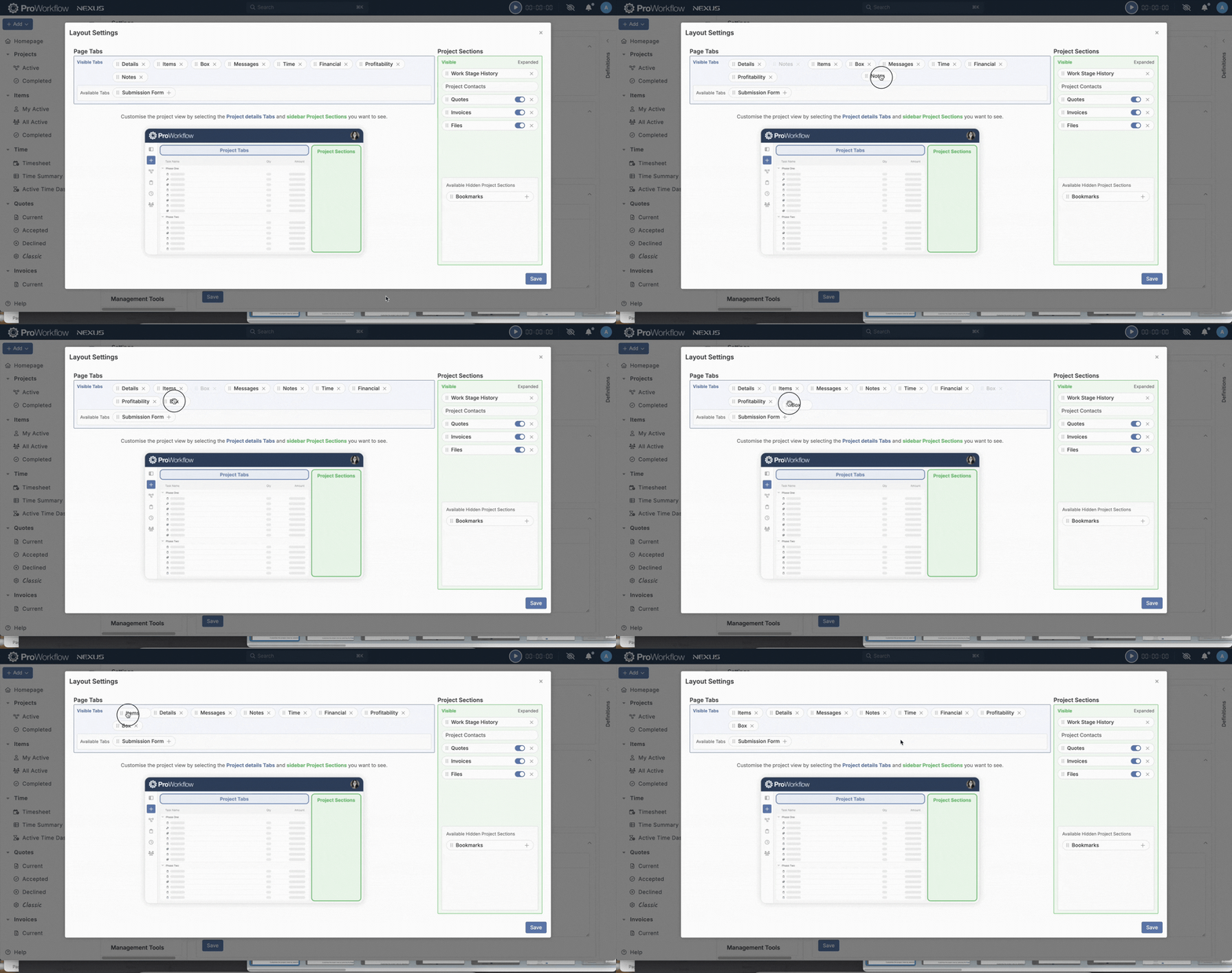
Feature Addition (and Improvement!): Re-order Project Layout, and Apply Default Project Layout Settings to All Active Projects
We’ve added a new functionality that allows you to re-order sections on your Project Layout. We’ve also added the ability to apply any changes you make to your default Project Layout Settings to all existing Projects. For more information on how to do this, please see this help article.
Feature Improvement: Drill into Projects on the Projects List Gantt Chart
We’ve improved our Projects List Gantt chart so that when you expand a particular Project, you can now view the Items in that Project on the Projects List Gantt chart:

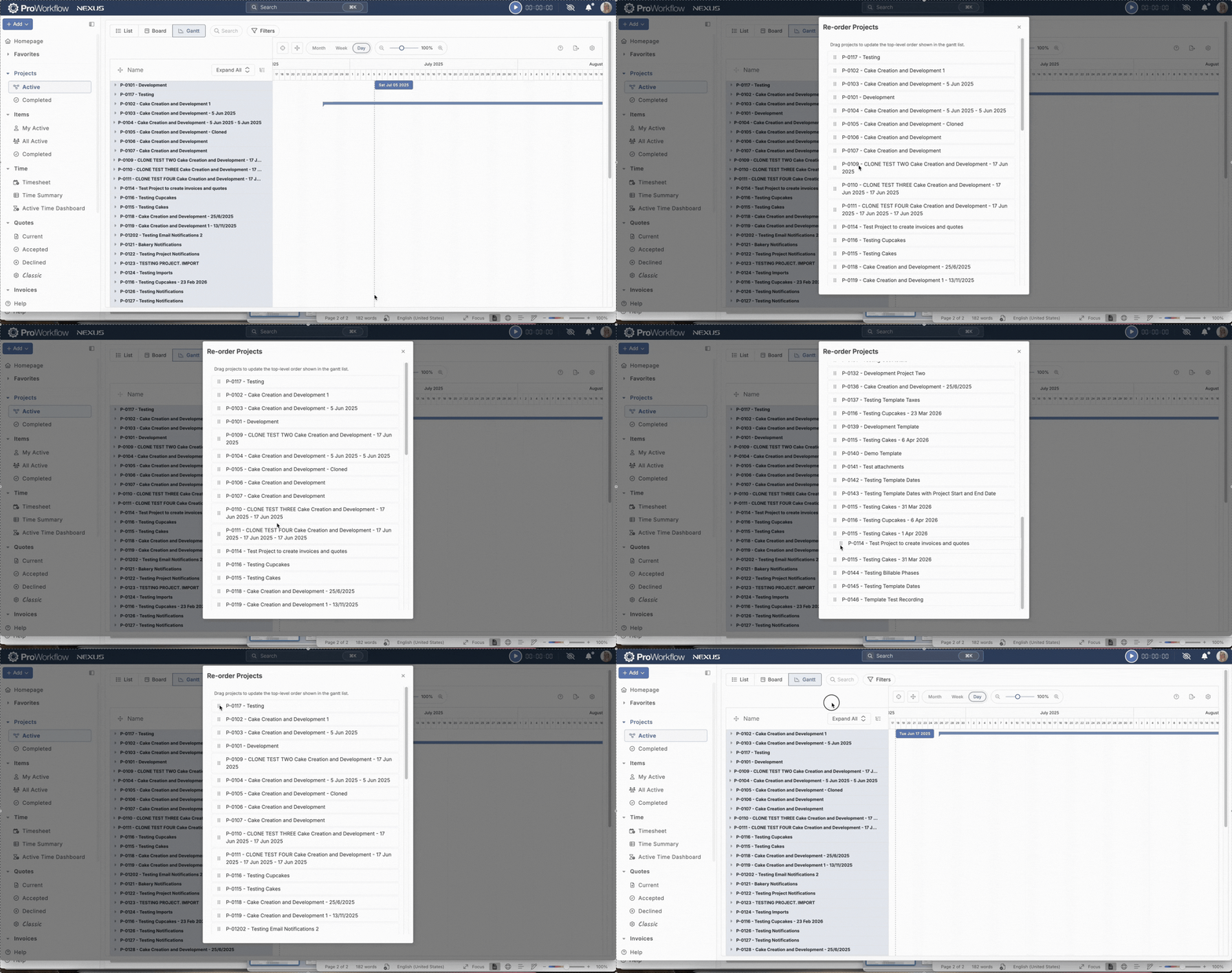
Feature Improvement: Drag to Reorder Projects List Gantt Chart
We’ve also added the ability to customize the order that your Projects appear in on your Gantt chart by clicking and dragging.
Feature Improvement: File Space Manager
We’ve added several improvements to the functionality of our File Space Manager! One new functionality is the ability to filter your files by the Project or Client they’re assigned to, or to filter by the Project Complete Date. We’ve also added additional available columns (and the ability to add or remove these columns), along with a “sort by” functionality for every column. Finally, we’ve added an “Export CSV” option which allows you to export your list of files to Excel:


Feature Improvement: Use Work Stage Colors on Time Sheet
We’ve introduced the option to color-code your time entries on your Timesheet by either Project Work Stage or Item Work Stage. This can help you tell at a glance what stage the work you are tracking is at. Click on the cog in the top right corner of your Timesheet to manage these settings:

Feature Improvement: Search Bar Visibility
We’ve increased the color contrast of our search bar to improve visibility for users with visibility concerns. Please let us know if you ever have any visibility concerns about the site, we always want to be conscious of this!

Feature Improvement: Add Custom Tax Codes
We’ve added a functionality to our Tax Codes so that, when you are not integrated with an accounting provider, you can create custom Tax Codes to suit the needs of your business/state/region. Please note that if you are integrated with an accounting provider, you’ll need to manage your Tax Codes through your accounting provider.

Feature Addition: Item Description Indicator
We’ve added a new feature to your Items lists, that indicates when an Item has a description. Hovering over the icon even gives you a preview of the description:


Feature Addition: Move Contacts to Nexus
When you are in the process of converting to Nexus, you may find it useful to move your contacts to Nexus. We have added a tool for doing so, which can be found in the same section of your Settings as our Convert Projects to Nexus tool:

Feature Improvement: Expand Clients to View Client Contacts
We’ve added an “expand client” feature that allows you to more easily view the Client Contacts of a Client Company. You can either click on a particular Client to expand it, or select “Expand all” to expand all of your Clients:

Get These Features By Upgrading to ProWorkflow Nexus Today!
Whether you are an existing Classic customer who is looking to convert to Nexus, or you’re a new prospective client who wants to start a subscription with us, you can start using Nexus today to take advantage of these exciting new features. Existing clients please reach out to our Support team at [email protected] to get Nexus enabled for your account and start the migration process. New clients please start a trial account or contact our Sales team at [email protected].