
If you’re comparing Teamwork vs Asana for your project management needs, you’re likely wrestling with a fundamental question: do you need a general-purpose project management tool or a solution specifically built for your industry’s unique project needs?
However, what most project management tool comparisons overlook is a third player that’s been quietly serving professional services firms since 2002. ProWorkflow offers a unique combination of advanced features, simplicity, depth, and exceptional support that neither Asana nor Teamwork fully delivers.
So the real questions you should be asking are:
- Do you need broad work management capabilities or specialized tools for client projects and billing?
- Is your priority team collaboration and goal alignment, or accurate time tracking and profitability?
- Do you need native financial management features, or are you comfortable with integrations?
- Are you willing to trade a steeper learning curve for more comprehensive features?
- How important is having real human support available 24/7?
In short, here’s what we recommend:
👉 Asana is the gold standard for general work management, offering an intuitive interface, powerful automation, and seamless team collaboration. Manage tasks using Goals, Portfolios, and AI-powered assistance; it excels at helping teams connect daily tasks to strategic objectives. However, it lacks built-in time tracking, billing, and invoicing, or advanced client management features that client-facing businesses need.
👉 Teamwork is purpose-built for agencies and client work, combining project management software with native time tracking tools, budgeting, and client collaboration features. Teamwork offers a comprehensive suite that includes everything from resource planning to invoicing, making it ideal for businesses that bill by the hour. The trade-off is a steeper learning curve and potential overwhelm from its extensive feature set.
Both Asana and Teamwork are powerful choices for their respective audiences. But what if you need professional-grade project management without the overcomplexity, backed by support that actually picks up the phone?
👉 ProWorkflow has been serving professional services firms for over 20 years with a balanced approach that combines advanced task management features, time tracking tools, quoting, and invoicing capabilities. With multiple project views, custom templates, and reporting features, it offers everything needed to manage projects without unnecessary complexity, all on one platform. Real 24/7 support and intuitive design make it one of the best project management tools for agencies, consultants, and creative businesses that want clarity and control over the entire project.
Table of Contents:
- Asana vs Teamwork vs ProWorkflow at a glance
- The philosophical divide: Internal team collaboration vs external client project management
- Asana excels at team collaboration and strategic alignment
- Teamwork dominates agency-specific features
- ProWorkflow balances power with simplicity for professional services
- Time tracking and financial management reveal each platform’s priorities
- Reporting capabilities show who’s serious about project insights
- Pricing models reflect different target markets
- Asana vs Teamwork vs ProWorkflow: Which one should you choose?
Asana vs Teamwork vs ProWorkflow at a glance
Asana | Teamwork | ProWorkflow | |
|---|---|---|---|
Founded | 2008 | 2007 | 2002 |
Primary Focus | General work management | Agency & client projects | Marketing, AEC, IT, and software development companies |
Time Tracking | ⭐⭐ Limited | ⭐⭐⭐⭐⭐ Native, multiple methods | ⭐⭐⭐⭐⭐ Native, flexible options |
Invoicing | ❌ Not available | ⭐⭐⭐⭐ Built-in | ⭐⭐⭐⭐⭐ Built in and Integrated with accounting |
Quoting/Estimating | ❌ Not available | ⭐⭐⭐⭐ Native feature | ⭐⭐⭐⭐⭐ Native quote to project conversion |
Reporting | ⭐⭐⭐⭐ Good dashboards | ⭐⭐⭐⭐⭐ Comprehensive | ⭐⭐⭐⭐⭐ Highly customizable with an option to be scheduled |
Materials/Expenses | ❌ Limited tracking | ⭐⭐⭐⭐ Expense tracking | ⭐⭐⭐⭐⭐ Full tracking system |
Client Access | ⭐⭐ Guest access | ⭐⭐⭐⭐⭐ Unlimited free | ⭐⭐⭐⭐⭐ Unlimited free |
Learning Curve | ⭐⭐⭐ Moderate | ⭐⭐ Steep | ⭐⭐⭐⭐⭐ Gentle |
Customer Support | ⭐⭐⭐ Email, varies by plan | ⭐⭐⭐⭐ Responsive | ⭐⭐⭐⭐⭐ 24/7 human support over email, call, and chat |
Mobile Apps | ⭐⭐⭐⭐⭐ Full-featured | ⭐⭐⭐⭐ Good functionality | ⭐⭐⭐⭐ Good functionality |
Starting Price | Free up to 10 users, then $10.99/user/month | Free up to 5 users, then $13.99/user/month with 3 users minimum | $20/user/month |
The philosophical divide: Internal team collaboration vs external client project management
Understanding each platform’s core philosophy reveals why feature comparisons often miss the point.
Asana software was born from Facebook’s internal need to reduce “work about work.” Founders Dustin Moskovitz and Justin Rosenstein built it as a universal work management platform where any team could organize any type of work. This breadth is both its strength and limitation. Asana excels at helping marketing teams plan campaigns, product teams track sprints, and HR teams manage recruiting. This broad approach makes it great for collaboration tools, but limited in its billing features and financial reporting.

Teamwork project management software emerged from a web agency’s frustration with existing project management tools. Founders Peter Coppinger and Dan Mackey needed something that understood the realities of client work: tracking billable hours, managing budgets, and keeping clients in the loop. Every feature reflects this origin story. Native time tracking isn’t an afterthought; it’s central to how projects are managed.

ProWorkflow predates both, starting in 2002 when Julian Stone created a basic job tracking app for his PalmPilot. Designed as project management software for professional services, such as marketing agencies, AEC (Architecture, Engineering, Construction) firms, IT companies, and software development teams. It offers all the tools needed to organize, manage, and collaborate:
- Project dashboards and workload management
- Multiple ways to view tasks (Gantt charts, Kanban boards, calendars)
- Advanced reporting and customization options, like creating custom fields
- Integrated time tracking and billing tools that connect directly with financial budgets and invoicing

Asana excels at team collaboration and strategic alignment
Asana’s greatest strength lies in helping teams work together more effectively while staying aligned with company goals.
The platform’s task management capabilities set the standard for the industry. Tasks can be viewed as lists, boards, timelines, or calendars, letting each team member work in their preferred style. The unique ability to add a task to multiple projects without duplication keeps everyone informed without creating redundant work.
Where Asana truly shines is connecting daily work to strategic objectives. The Goals feature lets organizations set company-wide targets, then link unlimited projects and tasks directly to these goals. Real-time dashboards show exactly how everyday work contributes to bigger picture success.

Source: Asana
Workflow automation through Rules reduces repetitive tasks significantly. When a task moves to a certain stage, Asana can automatically assign tasks to the right people, update custom fields, or send notifications. The new AI features take this further, generating task lists from project descriptions and summarizing complex discussions.
But for professional services firms, Asana’s limitations become apparent quickly. While it has basic time tracking, it doesn’t differentiate between billable and non-billable hours. You also can’t generate invoices or quotes, or manage financial budgets natively. For agencies or consultancies, these gaps are deal-breakers.
Teamwork dominates agency-specific features
Teamwork understands agencies because it was built by one. This DNA shows in every feature.
Built-in time tracking tools integrate seamlessly into the workflow. Team members can start timers from any task, log time manually, or use timesheets. The drag-and-drop timesheet makes end-of-week entry painless. More importantly, this time data flows directly into project budgeting and invoicing.
The billing and invoicing capabilities transform Teamwork from a simple project management tool into a broader business management platform. Users can create detailed quotes, convert them into projects with one click, track budgets in real time, and generate invoices from logged time. Profitability reports highlight which projects and clients drive revenue.
Resource management features help agencies avoid their biggest challenge: overworking their teams. The Workload Planner shows who’s overwhelmed and who has capacity. Project managers can forecast resource needs for upcoming projects and improve workload management to prevent burnout.

Source: Teamwork
Teamwork focuses on client collaboration, which goes beyond basic guest access. Create companies to help teams organize users and customize user permissions. Unlimited free client users can view project progress, comment on tasks, and approve deliverables. The proofing feature streamlines creative approvals with visual annotations and version control.
However, Teamwork’s comprehensive feature set creates its own challenges. New users often feel overwhelmed by the advanced features. The learning curve is steep, especially for team members who just need basic task management. Some users report performance issues with very large or complex projects.
ProWorkflow balances power with simplicity for professional services
ProWorkflow takes a different approach: providing everything professional services firms need without overwhelming them with options they don’t.
The platform covers the essentials exceptionally well. Project management features include multiple project views (Gantt charts, Kanban boards, list, and calendar) without clutter. Tasks can be created, scheduled, and tracked easily, supported by collaboration tools that make it simple for team members to communicate. The recent product iteration adds modern polish while maintaining the user-friendly interface that users value.

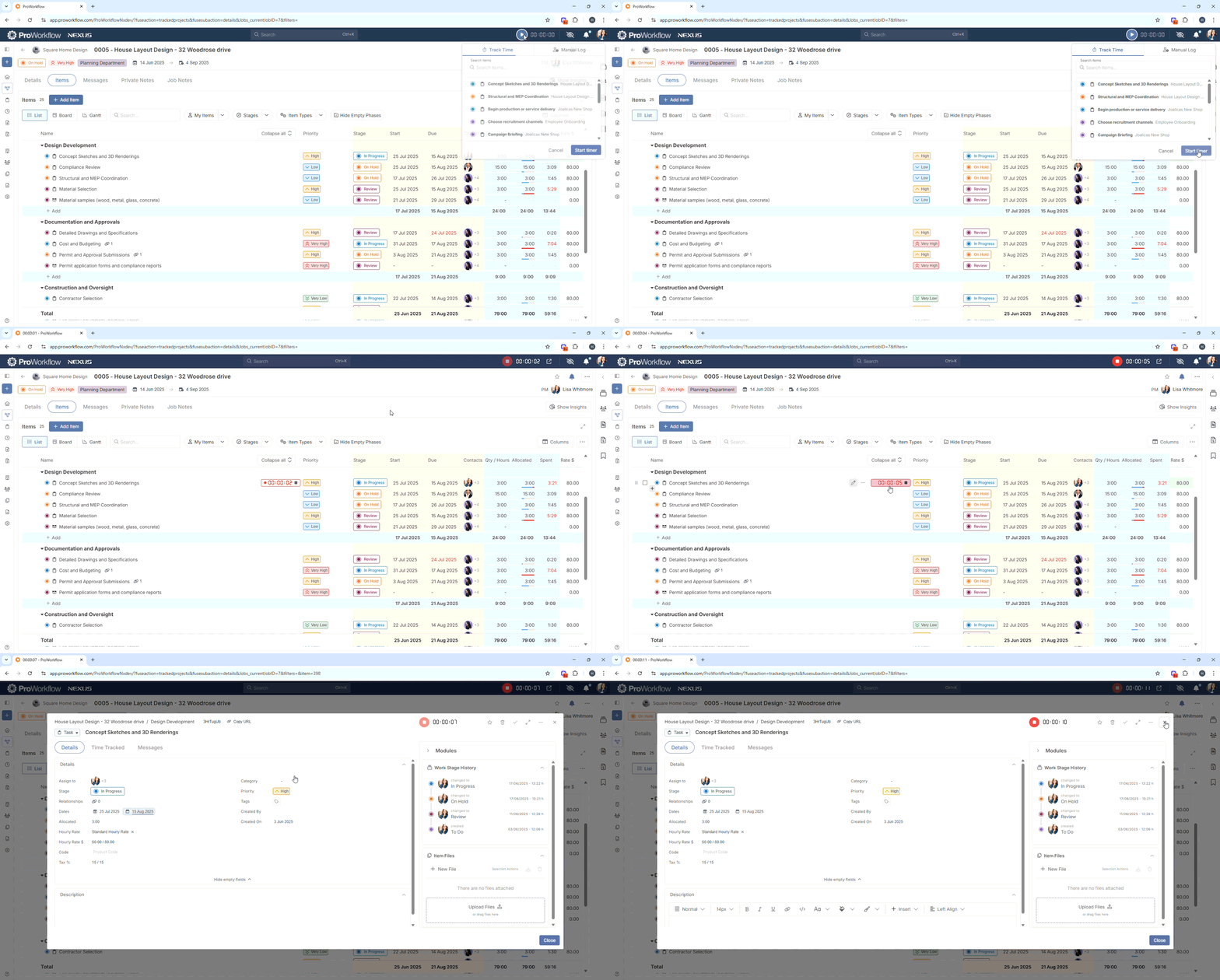
Time tracking tools accommodate different working styles. Use the stopwatch for real-time entry, log manually afterwards, or use the drag-and-drop timesheet for bulk input. The desktop widget and Chrome extension ensure you can track hours anytime.

ProWorkflow’s financial features rival dedicated accounting software with materials & expenses management, invoicing, quoting & estimating, and profit & cost tracking. Create detailed quotes with customizable templates, convert approved quotes directly to projects, and generate invoices from tracked time and expenses. The integration with QuickBooks, Xero, and other accounting platforms eliminates double-entry. Materials and expenses tracking ensures every project cost is captured.

The advanced reporting features deserve special mention. While all three platforms offer reporting, ProWorkflow’s custom report builder with extensive templates and filters provides insights that typically require enterprise-level tools. Generate reports on time, projects, workload, profitability, and more with granular control over what data to include.

What truly sets ProWorkflow apart is its customer support. Unlike competitors that gate support behind pricing tiers, ProWorkflow offers email and phone support 24 hours a day (except Sundays) to all users. Real humans answer, not chatbots. They help with implementation, onboarding, and ongoing questions. For firms used to software vendors that disappear after the sale, this level of support is transformative.
Time tracking and financial management reveal each platform’s priorities
How each platform handles time and money tells you everything about their target market.
Asana’s project management software includes basic time tracking, but it does not support billable hour tracking. If you need to separate billable from non-billable time or generate invoices, you will still need integrations with tools like Harvest or Toggl. This adds complexity, cost, and potential points of failure. For teams that do not bill by the hour, Asana’s built-in tracking might be enough. But for professional services, it falls short.
Teamwork builds time tracking into everything. Start timers from tasks, log time from mobile devices, or use the Chrome extension. Time entries automatically calculate against project budgets. The native invoicing means you can bill clients without switching platforms. It’s comprehensive but can feel overwhelming if you don’t need all the options.
ProWorkflow strikes a pragmatic balance. Time tracking is powerful but not complicated. The multiple entry methods mean everyone can track time their way. The connection to invoicing and reporting is seamless. You’re not forced to use features you don’t need, but they’re there when you do.
Reporting capabilities show who’s serious about project insights
All three platforms offer reporting, but their approaches reveal different priorities.
Asana offers dashboards and reporting focused on project progress and team productivity. You can track completed tasks, see project timelines, and monitor workload. The universal Reporting feature provides organization-wide insights. But without billable time tracking or financial data, these reports miss crucial information for professional services firms.
Teamwork goes deep on agency-specific reporting. Track project profitability, billable vs non-billable time, budget burn rates, and resource utilization. The scheduled reports feature automates report delivery to stakeholders. Custom reports let you slice data any way you need. It’s powerful but requires time to master.
ProWorkflow’s reporting combination of pre-made report templates and a custom report builder means you can generate insights quickly or dive deep when needed. Reports cover projects, tasks, time, workload, finances, and more. The GraphQL API enables developers to build completely custom reports. Export options include PDF, Excel, and XML for further analysis.
Pricing models reflect different target markets
Each platform’s pricing structure reveals who they’re really built for.
Asana has a freemium model that is very welcoming for small teams and startups. Its Personal plan is a robust free-forever option for up to 10 users, making it a popular entry point for general task management. However, for businesses needing more advanced project management features, the paid plans are necessary. The Starter plan is priced at $10.99 per user, per month when billed annually ($13.49 billed monthly) and unlocks key features like workflow automation and timelines. For large teams managing complex projects that need more advanced capabilities such as portfolio management and time tracking, choose the Advanced plan at $24.99 per user, per month, annually ($30.49 billed monthly).
Teamwork’s free plan, the Free tier, can be used by up to 5 users and is suitable for very small teams or those just starting out. The Deliver plan starts at $10.99 per user, per month (with a 3-user minimum) when billed annually, and includes features for managing client projects. The Grow plan, at $19.99 per user, per month, annually (with a 5-user minimum), adds more advanced resource management and budgeting tools. For larger organizations with more complex projects, Teamwork offers a custom-priced Scale plan.
ProWorkflow keeps it simple with pricing: Professional plan is $20 per user per month and the Advanced plan is $30 per user per month. The Advanced plan includes features like Organizational Charts, Retainer Projects, project Templates, and Custom Project Fields. ProWorkflow doesn’t have a free plan, but it does have a 14-day free trial that doesn’t require a credit card. Client access is unlimited and free across all plans. Annual billing comes with a 10% discount.

Asana vs Teamwork vs ProWorkflow: Which one should you choose?
The best platform depends on your business type, client needs, and complexity tolerance.
Choose Asana if:
- You need a general project management tool for diverse teams
- Goal tracking and strategic alignment are priorities
- You don’t bill clients by the hour
- You rely on integrations with dedicated tools
Choose Teamwork if:
- You run an agency or client services business
- You need comprehensive resource and financial management
- You’re willing to invest time in learning a feature-rich platform
- Native time tracking and invoicing are non-negotiable
Choose ProWorkflow if:
- You’re a professional services firm (marketing, AEC, IT, software development)
- You want powerful features without overwhelming complexity
- Exceptional customer support matters to your success
- You need robust reporting and financial management
Experience ProWorkflow’s balanced approach with a 14-day free trial.
Why ProWorkflow might be the smarter choice
The project management landscape offers no perfect solution, only tools optimized for different needs. Asana excels at general work management and team collaboration. Teamwork provides comprehensive agency-specific features. ProWorkflow delivers what professional services firms actually need with support that sets a new standard.
Sometimes the best choice isn’t the newest or most feature-rich platform. It’s the one that helps you deliver great work for clients without creating more work for your team.
That’s precisely why ProWorkflow stands out. Our software’s project management features balance powerful functionality with the kind of hands-on support that makes it the clear choice for service-driven businesses. Start your 14-day free trial today.